
You can access your FTP Account using the FileZilla FTP Client or any FTP Client.
1. Open the FileZilla FTP Client.
2. Enter your FTP host, username and password. You can use your cPanel login details as your FTP user and password. Enter your domain name such as ftp.example.com or example.com in the Host field.
3. Click on Quick Connect. It will take a few seconds to connect. Then your website files will appear on the right side.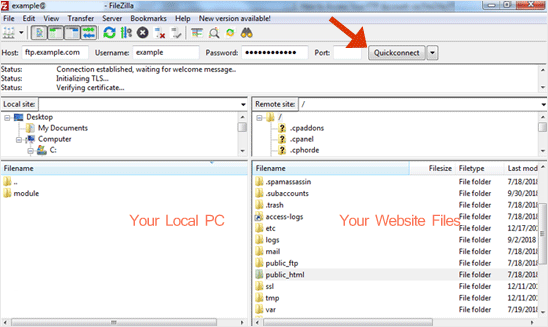
You can now start using the FileZilla Client, manage your website, and upload/delete files from your website.
- Home
-
Services
- Browse All
- Hosting on Server2
- VPN Service
- Server Licensing
- Vps Servers
- Dedicated Servers with cpanel whm & root
- WHMCS Licenses
- WebSite SEO
- Dedicated Support Packages
- WordPress Web Design Packages
- Monthly Care Plans (Pair With Your Dedicated Support
- Acronis Cyber Cloud (box2 backup)
- Dual Xeon Dedicated Server + Cpanel + More
- hosting Deals
- Announcements
- Knowledgebase
- Network Status
- Contact Us
-
More