
You can easily change the password if you have access to your WordPress account.
1. Log in to the WordPress dashboard.
2. From the Dashboard menu, go to Users and click on Profile.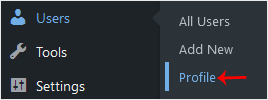
3. Scroll down to Account Management and click on Set New Password.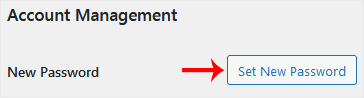
4. Copy the password to a safe place and click on Update Profile to change your password.
- Home
-
Services
- Browse All
- Hosting on Server2
- VPN Service
- Server Licensing
- Vps Servers
- Dedicated Servers with cpanel whm & root
- WHMCS Licenses
- WebSite SEO
- Dedicated Support Packages
- WordPress Web Design Packages
- Monthly Care Plans (Pair With Your Dedicated Support
- Acronis Cyber Cloud (box2 backup)
- Dual Xeon Dedicated Server + Cpanel + More
- hosting Deals
- Announcements
- Knowledgebase
- Network Status
- Contact Us
-
More