
You can forward an email to other email accounts using Mozilla Thunderbird.
1. Open Mozilla Thunderbird.

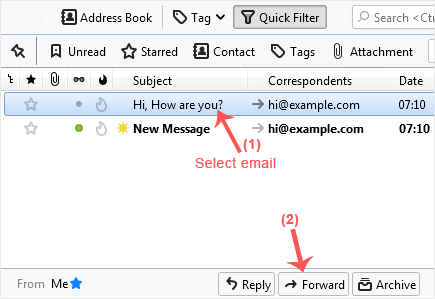
2. Go to Inbox. Select the message you want to forward, and it will show the Forward option. Click it.
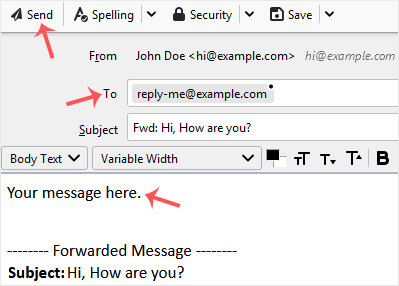
3. Type your message in the message box. Do not modify the email title and the rest of the text. Then click on send.
- Home
-
Services
- Browse All
- Hosting on Server2
- VPN Service
- Server Licensing
- Vps Servers
- Dedicated Servers with cpanel whm & root
- WHMCS Licenses
- WebSite SEO
- Dedicated Support Packages
- WordPress Web Design Packages
- Monthly Care Plans (Pair With Your Dedicated Support
- Acronis Cyber Cloud (box2 backup)
- Dual Xeon Dedicated Server + Cpanel + More
- hosting Deals
- Announcements
- Knowledgebase
- Network Status
- Contact Us
-
More