
BoxTrapper requires all email senders not on your Whitelist to respond to verification emails. It protects you from spam.
If you want to get rid of unwanted emails, enable Boxtrapper either on all emails or just selected emails and configure it.
1. Log in to your cPanel Account,
2. In the Email section, click on BoxTrapper.

3. On the BoxTrapper's page, you see a list of your emails under the Account heading and the status of BoxTrapper under the Status heading. Choose Manage.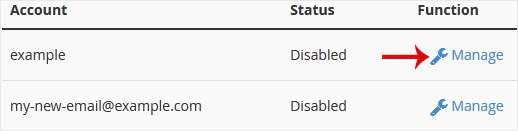
4. On the BoxTrapper's Manage page, if the status is Disabled, Choose Enable.
- Home
-
Services
- Browse All
- Hosting on Server2
- VPN Service
- Server Licensing
- Vps Servers
- Dedicated Servers with cpanel whm & root
- WHMCS Licenses
- WebSite SEO
- Dedicated Support Packages
- WordPress Web Design Packages
- Monthly Care Plans (Pair With Your Dedicated Support
- Acronis Cyber Cloud (box2 backup)
- Dual Xeon Dedicated Server + Cpanel + More
- hosting Deals
- Announcements
- Knowledgebase
- Network Status
- Contact Us
-
More